




Chiphone Federal Credit Union proudly introduces MessagePay, a convenient tool designed for those moments when time is of the essence. With MessagePay, making a payment quickly to avoid late penalties is possible and cost-effective.
MessagePay transforms how you handle your loan payments with us. This cutting-edge platform enables you to initiate payments swiftly from your mobile device, leveraging any external bank account. It’s the ideal solution for ensuring your payments are on time, especially when you’re down to the wire.
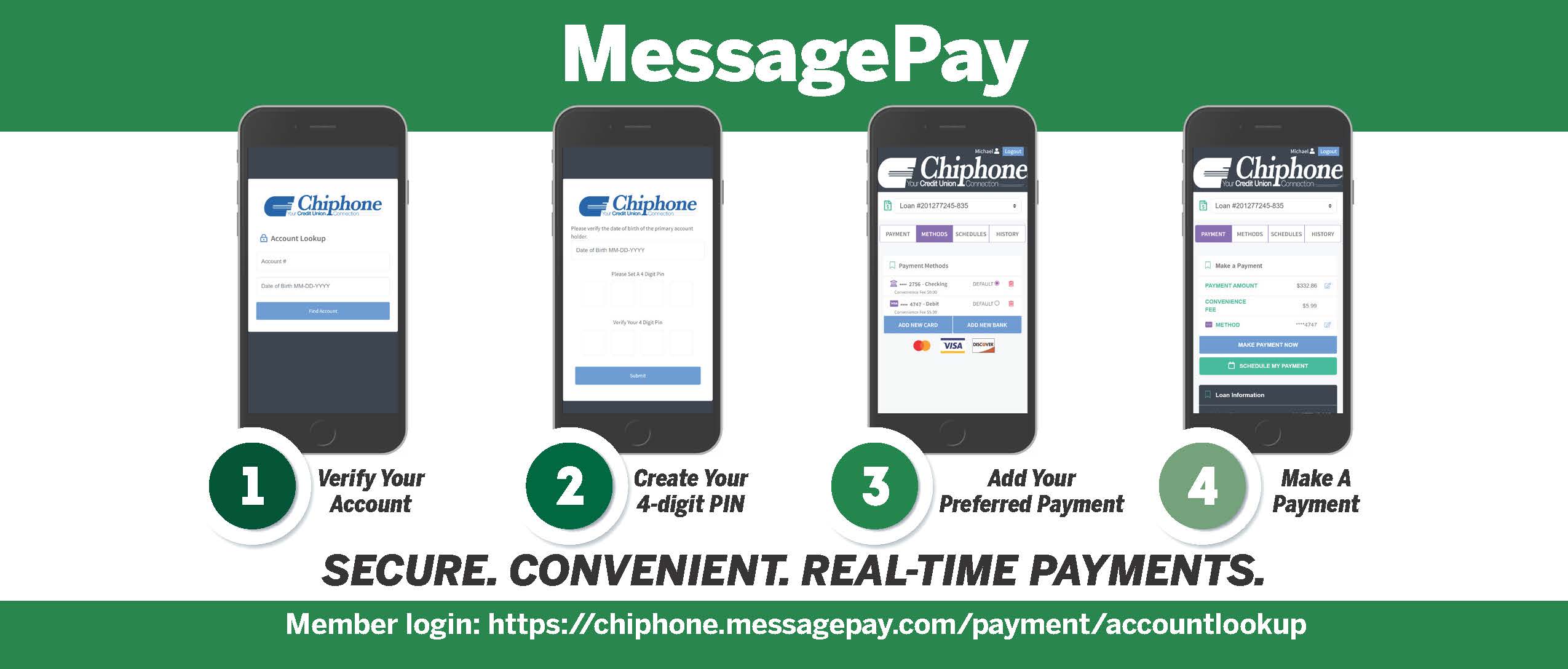
How MessagePay Works:
Account Lookup for first time users
- The first time you visit our Message Pay payment portal you will need to authenticate your account with your Chiphone Account Number and Date of Birth.
- Next, you will be asked to create a 4-Digit Pin. Store this information in a secure location; you’ll need your pin number to verify future payments.
Add a Payment Method
- To make a payment you will have to add a preferred form of payment in the portal. You can do this by selecting “Add New Debit Card” or “Add New Bank Account” which will prompt a secure website for you to input your information. If completed correctly, there will be a message stating “Payment Method Success” and you’ll be redirected to the payment portal.
- You can add multiple methods and select which method you would like to be your “default” payment method.
Make a Payment
- Once you’ve added a payment method, you can visit the “Payment” screen to make your payment. Chiphone will charge a $5.99 convenience fee for all debit card transactions. To make your payment in full, select the blue “Make Payment Now” button.
- To edit your payment amount, you can touch the pencil icon to the right of the amount.
- You can also select a different payment method by touching the pencil icon to the right of the select method.
- Upon selecting “Make Payment Now,” a confirmation screen is shown to confirm that you want to make the payment with the selected method.
Setup Reoccurring Payment
You can set up your reoccurring payment in four simple steps.
- Login
- Click ‘Schedule My Payment’ button
- Fill out Payment Schedule
- Confirm Schedule Creation
That’s it! Your new reoccurring payment is set.
Member Benefits:
- Encrypted information guarantees your information is secure.
- Convenient ways to pay from an external account: text, website, or online/mobile banking.
- Payments accepted from Savings accounts, Checking accounts, and Debit cards (Visa, MasterCard, and Discover).
Frequently Asked Questions:
-
Can I make a payment on my loans through my online and mobile banking account?
Log in to your online and mobile account using your smartphone, tablet or desktop and select ‘Make a Payment’ from the menu bar located on the left. This will take you to the payment portal where you will have to verify your account.What kind of fees will I be charged?
Making a loan payment from another financial institution won’t cost you anything, if you choose to pay from a debit card, there is a $5.99 fee.Where to Find your Loan Number: Your Loan Number/Suffix is located on your monthly statement or on the original loan paperwork you were issued at the time you established your Chiphone loan account. On your Statement/eStatement, the Loan Number is listed as a 3-digit number. If you have established your Chiphone Online and/or Mobile Banking account, you may also retrieve your Account & Loan number from these sites.
Accepted Forms of Payment:
- You can use any of the following: Non-Chiphone debit cards (Visa, MasterCard or Discover). Chiphone does not accept American Express.
- ACH Direct Debit from another financial institution’s Savings or Checking account.
- If you want to make payments using funds in your Chiphone savings or checking account, you can use Chiphone’s Online Banking system (IT’S ME 247) to make a FREE payment.
Payment Posting Timeframes:
ACH/Bank Transfer:
- Payments processed before 3:45p EST, will post to your account the next business day (M-F).
- Payments processed after 4:00p EST, will post to your account in 2 Business days (M-F).
- Payments made on Saturday, Sunday, and Federal Holidays will take up to 2-3 business days to post.
Debit Card:
- Authorized Debit card payments are credited immediately and will post to your loan the next business day! A processing fee of $5.99 will be charged for each Debit card payment!
- Maximum debit card payment per transaction equals $3,000.00. Maximum Daily transaction amount equals $6,000.00.
*We Do Not process payments on weekends and Federal Holidays; however, payments can still be made to your loan(s).
If you have any questions about Chiphone’s MessagePay or encounter difficulties logging in, please contact our member service dept. (574) 294-3606.